



Below FAQ are some common concerns of our clients before purchasing the theme.
If you have other questions, please just send it to service@aimzenix.com.
按主題過濾
全部
- 全部
- After-sales problem
Need Help?
After-sales problem
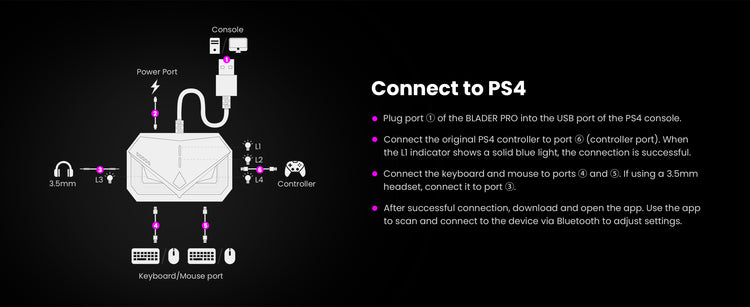
Q: “Why won't my device connect to the PS4 ?”
If connection fails (white light flashing), try the following: 1. Ensure the PS4 is set to USB wired connection mode in system settings. 2. Replug the controller cable. 3. Turn off the controller and reconnect it to the BLADER PRO. 4. Try a different USB port on the console. 5. Make sure the controller is an official original controller. 6. Try a different controller data cable. If the issue persists, please contact support via Discord: https://discord.com/invite/KarqS
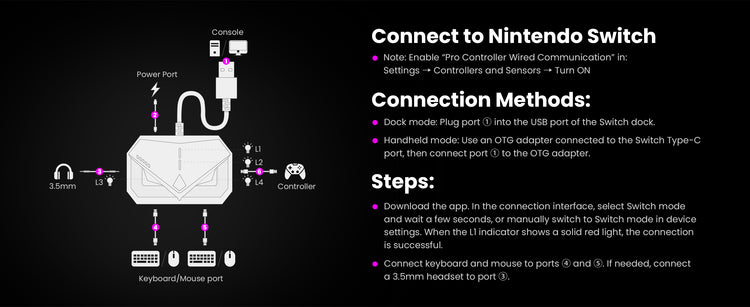
Q: “Why won't my device connect to the Nintendo Switch/NS2?”
If connection fails (white light flashing), try:
1. Check if Pro Controller Wired Communication is enabled.
2. Replug the USB connection.
3. Switch to Switch mode in the app before connecting.
4. Restart the Switch console.
5. Test with a Pro Controller to check if the Type-C port is functioning properly.
If the issue persists, contact support via Discord:
https://discord.com/invite/KarqS99Jfe
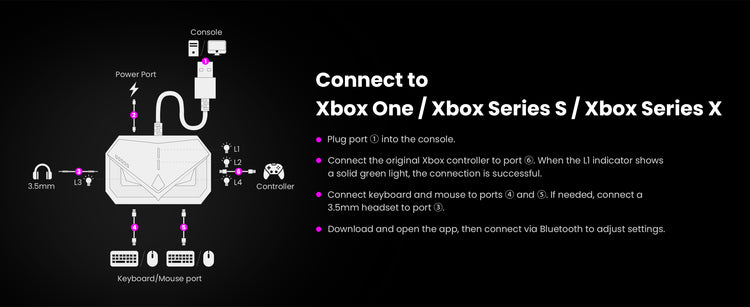
Q: “Why won't my device connect to the Xbox One / Xbox Series S / Xbox Series X?”
If connection fails (white light flashing), try:
1. Replug the controller cable.
2. Turn off the controller and reconnect.
3. Try a different USB port.
4. Ensure the controller is an official original controller.
5. Update the controller firmware to the latest version.
6. Try a different data cable.
If the issue persists, contact support via Discord:
https://discord.com/invite/KarqS99Jfe
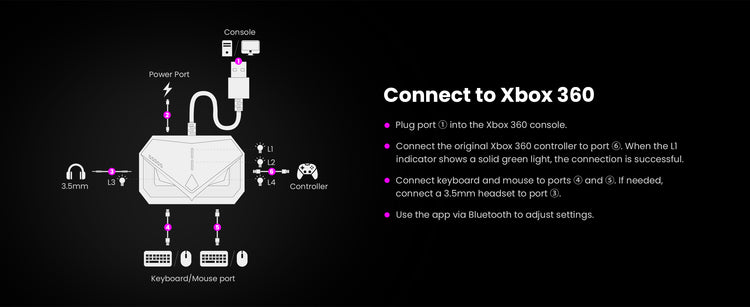
Q: “Why won't my device connect to the Xbox 360?”
If connection fails (white light flashing), try:
1. Replug the controller cable.
2. Try a different USB port of the console.
3. Ensure the controller is an official original controller.
If the issue persists, contact support via Discord:
https://discord.com/invite/KarqS99Jfe

